In short
- Most teams use Copilot as a chatbot. The real gain is in Cowork, where Copilot carries out tasks itself in your Microsoft 365 environment and in the systems you connect.
- What makes Cowork useful is skills: written-down ways of working that let Copilot do a task your way, every time. This month skills are also coming to Copilot Chat.
- Start with one task that comes back every week, have everything prepared as a draft and keep a person responsible for whatever leaves the building.
If your organisation runs on Microsoft 365 Copilot, you do not need to switch to Claude or ChatGPT to get AI to do real work. Since this year Copilot has Cowork: an agent that takes on an assignment, makes a plan for it and delivers the result in Outlook, Word, Excel, PowerPoint or SharePoint. Microsoft built Cowork together with Anthropic, on the technology behind Claude Cowork.
Yet most teams stay in the chat window: asking a question, summarising an email, rewriting a paragraph. That uses only a small part of what the licence can do. This article gives the overview: what Cowork is, why skills make the difference and how we set it up with teams.
Series: Copilot in practice
This is part 1 of a series on Microsoft Copilot. Over the coming weeks we go deeper, one topic at a time: what Microsoft Ignite changes, building your first skill, connecting Copilot to your CRM and other systems, projects and automations, Copilot in Word, Excel and PowerPoint, and training a team to turn a licence into a habit.
What is Copilot Cowork, and how is it different from Chat?
Chat answers a question. Cowork carries out an assignment. You describe what needs to happen, Copilot makes a plan, works through the steps and lets you follow along and adjust. For example: collect the open items from this week's emails, put them in Planner and draft an update for the team.
Microsoft made Cowork generally available worldwide on 16 June 2026 for organisations with a Microsoft 365 Copilot licence. Since October, Chat and Cowork share one screen in the Copilot app, with a toggle in the prompt box (Microsoft Learn).
The screens below show the difference. In Chat you send a message. In Cowork you start a task, here inside a project where Copilot already has the files, meetings and emails around that topic as context.
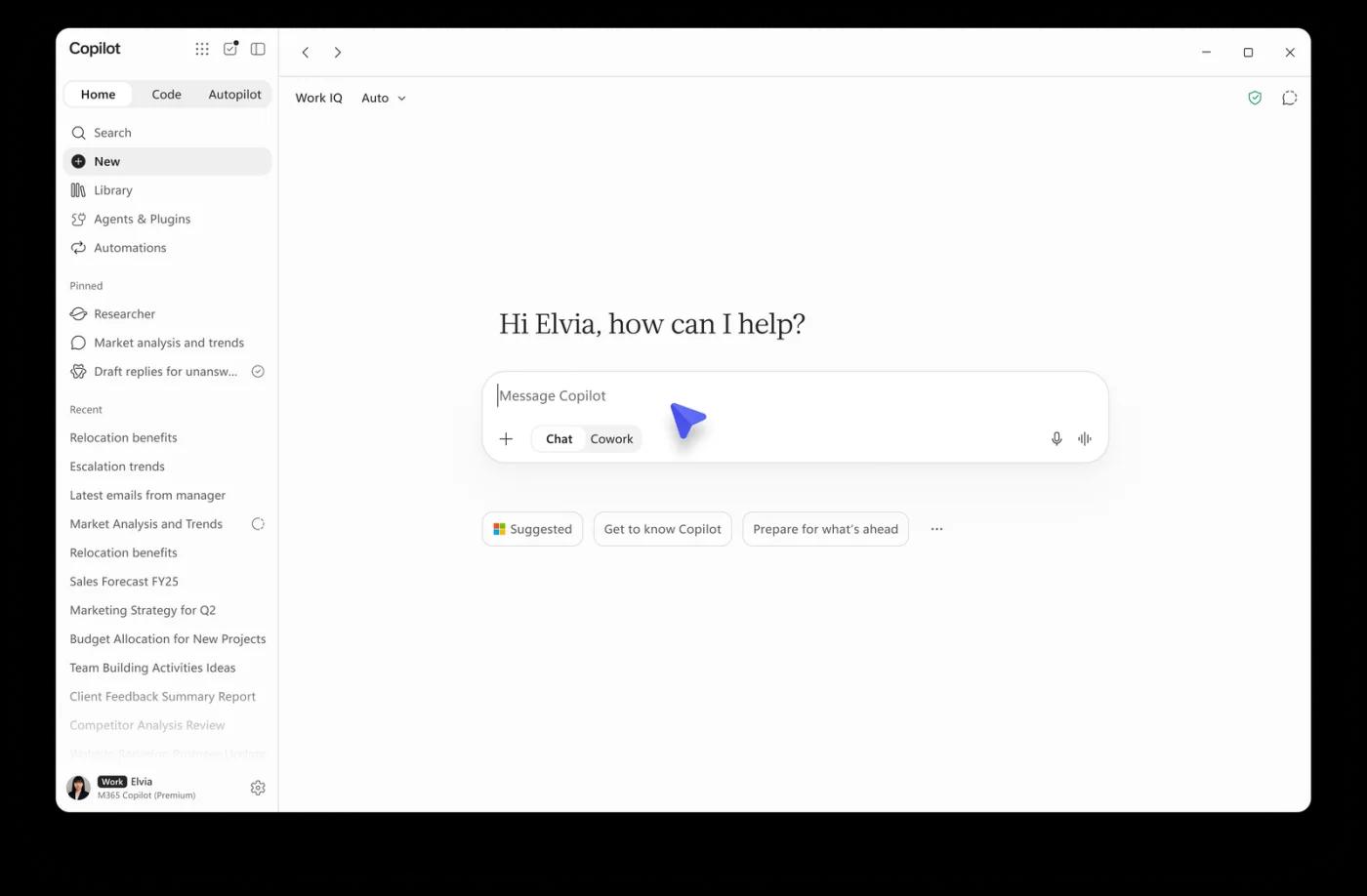
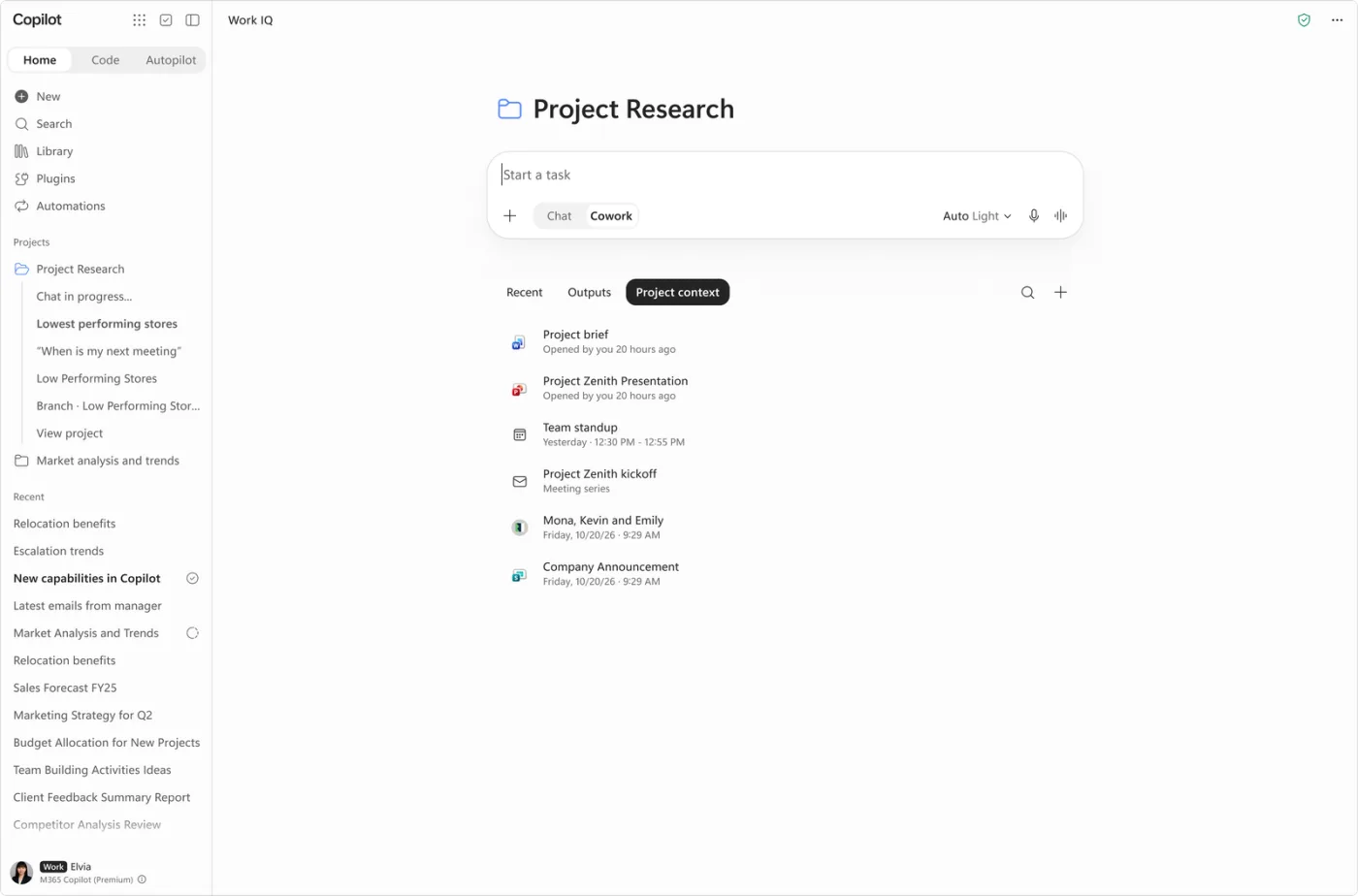
Image: Microsoft, What's New in Microsoft Copilot, October 2026, 30 October 2026.
| Chat | Cowork | |
|---|---|---|
| You give | a question | an assignment |
| You get | an answer or first draft | the result in your apps |
| Cost | within your licence | per task, in Copilot Credits |
Two things to know before you start. Cowork is off by default, so an admin has to turn it on. And its tasks are not covered by the fixed licence: they are billed per use in Copilot Credits. How that works and how to set a budget is explained in What will Microsoft Copilot cost.
Why skills are the real gain
A skill is a written-down way of working: a short instruction, sometimes with a template or example, that Copilot uses whenever a task calls for it. Instead of explaining every time how you structure a proposal or write a client update, you capture it once.
Three things make skills in Copilot strong:
- You create them in plain language. From November, Microsoft is rolling out the option to create a skill in Copilot Chat by describing what you want (Microsoft). In PowerPoint you can even demonstrate a recurring task and have it recorded.
- They work together. A skill for your writing style and a skill for your Word template combine into a proposal that sounds and looks the way you want.
- You share them with your team. Colleagues find shared skills under Agents & Plugins. A whole department then works the same way, rather than everyone with their own prompts.
Suppose your account managers send a client update every Friday: what was done, what is open and what happens next. With a skill, Cowork gathers that week's emails and meeting notes, puts the update in your standard structure and writes it in your tone. The account manager reads it, edits and sends it themselves. This is a fictional example, but it is exactly the kind of task skills are made for: it comes back often, is largely the same each time and currently takes more time than it should.
The format closely resembles that of Claude and other AI tools. If you use another tool alongside Copilot, read Claude skills: capture once, use in every AI tool.
Connections: Copilot beyond Microsoft 365
Copilot already knows your email, calendar, Teams and SharePoint. Through plugins you connect other systems, such as HubSpot, Asana, Notion or Canva (Microsoft). Under the hood these connections use MCP (Model Context Protocol), the same open standard Claude and ChatGPT use. A plugin can bundle skills and connections, and your admin decides which plugins are available and who may use them.
That is the main point of attention. A connection works with the permissions of the user. If Copilot may also write to your CRM, it can change records there. So start read-only and only allow writing once a task has proven itself.
Two more building blocks complete the picture. In a project you bundle conversations, tasks, instructions, files and meetings around one client or topic, so Copilot always takes that context into account. And with automations a Cowork task starts at a set time or on an event, such as an incoming email or a new case in your CRM.
Copilot, Claude or ChatGPT?
Our view: if your organisation works in Microsoft 365 and has Copilot licences, get the most out of Copilot before adding a second AI tool. Claude and ChatGPT often ship new features a little earlier, but Copilot catches up quickly. Cowork runs on Anthropic technology, and in Cowork you choose between models from Anthropic and OpenAI, among others.
Copilot's big advantage is where it works. Cowork runs inside your own Microsoft 365 environment, with your email, files, meetings and the permissions already in place. The management, security and retention rules your IT team already uses apply here too. Claude Cowork mainly works from the user's computer and needs a connector to reach your Microsoft data. A broader comparison is in ChatGPT, Claude or Copilot for your team.
How we approach it: five steps
- Pick recurring work, not the nicest demo. Ask each team member to list the tasks that come back every week and how long they take. That is your starting point and, later, your yardstick.
- Build a writing style skill and a house style skill first. They come back in almost every other task, so they pay off fastest.
- Capture one skill per task and test it with real examples. Every correction you make goes back into the skill, so it improves with each round.
- Have everything prepared as a draft. Copilot prepares an email, document or update, a person reads, edits and sends it. Whoever sends it is responsible, not the tool.
- Share what works and measure. Open up good skills to the department and check after 30, 60 and 90 days whether the time savings are real. How to measure that is in Rolling out Microsoft Copilot in your team.
When is this not for you yet?
If you only have the free Copilot Chat and no Microsoft 365 Copilot licence, you have no access to Cowork. If permissions in SharePoint and OneDrive are messy, clean them up first: Copilot shows and uses everything an employee is allowed to open. And if most of your work happens outside Microsoft 365, for example in Google Workspace or separate systems, Claude or ChatGPT is often the better fit.
Keep in mind too that Copilot changes fast. This week is Microsoft Ignite, where new features are usually announced. What changes there for Cowork, skills and connections is the subject of the next part of this series.
Sources
- Microsoft, Copilot Cowork is now generally available, 16 June 2026
- Microsoft Learn, What's new in Microsoft 365 Copilot Cowork, accessed 17 November 2026
- Microsoft Tech Community, What's New in Microsoft Copilot, October 2026, 30 October 2026
- Microsoft Tech Community, Introducing the plugin registry
- Microsoft Learn, Manage plugins for Copilot Cowork
- Microsoft Learn, Managing AI experiences enabled by usage-based billing