In short
- Since 24 November 2026 you can install an artifact that Claude builds for you as an app on your Mac or Windows computer. It gets its own icon and window, opens like any other program and updates whenever the artifact is edited.
- It is a beta for every plan, in Claude Desktop. On Team it is on, with full access to the computer off. On Enterprise everything is off until an owner turns it on. You need to be online and signed in to Claude Desktop to open an app.
- Installing takes four clicks. The real decision is about permissions: an app can ask for notifications, keyboard shortcuts and even full access to your files, and Anthropic does not review apps beforehand.
An artifact is the tool, page or overview Claude builds next to the conversation: a calculator, a tracker, a dashboard. Until now you opened it inside Claude. With "Install as app" it becomes a standalone program on your computer, with its own icon in the Dock or the Start menu (Anthropic).
For a team, that turns a shared artifact into an internal tool people open like any other app, without anyone building, signing or rolling out a package. That is useful, and it is exactly why IT should make a few choices first. Below you will find what changes, the steps for Mac and Windows, and what to sort out before teams start sharing apps.
What changes when you install an artifact as an app?
An installed app shows your artifact in a window of its own. It is still the same artifact: when you or another editor changes it, the app changes too. An app can use Claude and your connectors just as the artifact does, and that use counts towards your plan's usage limits (Claude Help Center).
The difference lies in what the app may do on your computer. By default it can only do what a web page can. With your permission it can show notifications while you work elsewhere, add an icon to the menu bar or, at the highest level, run programs and read, change or delete files.
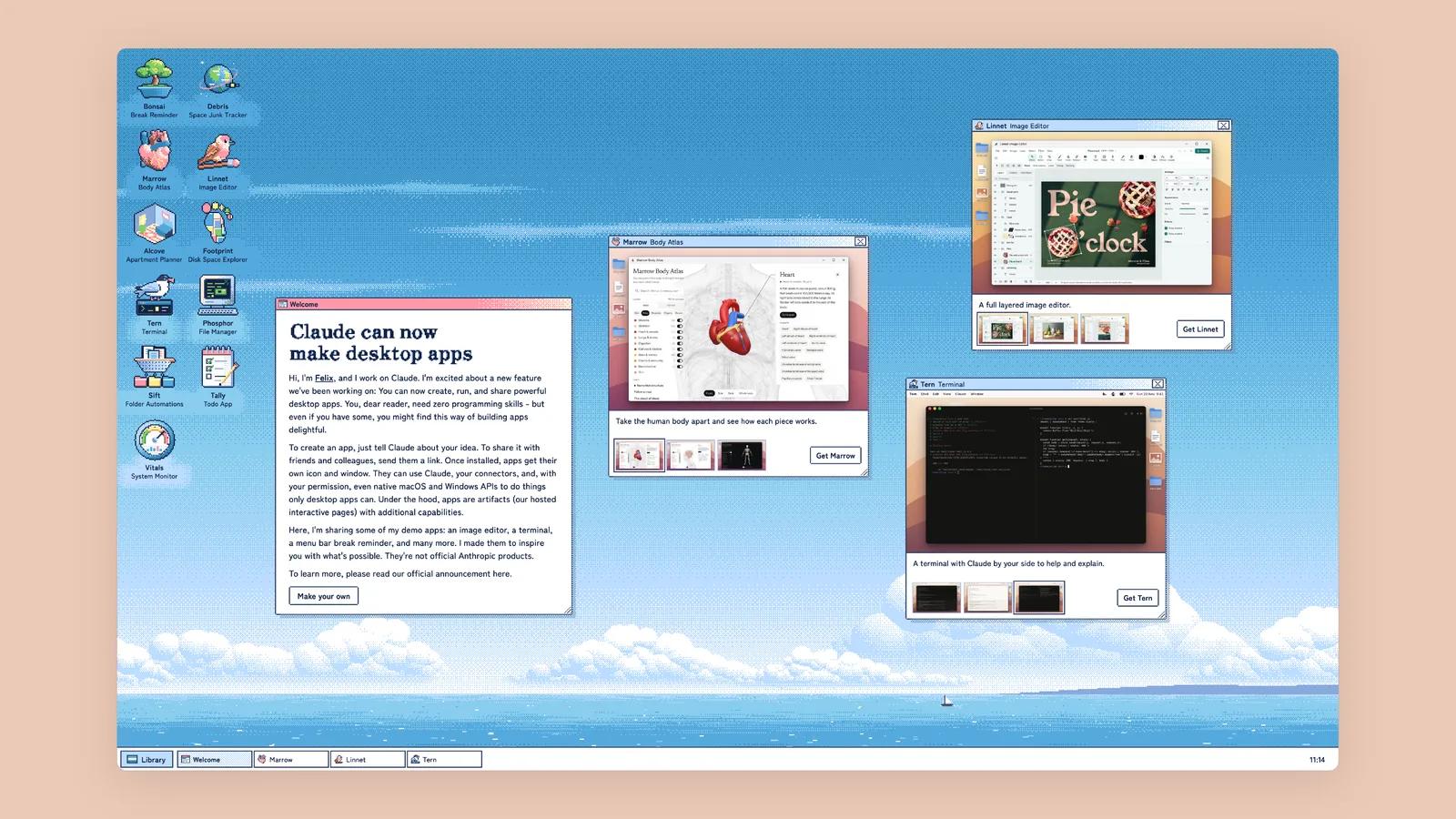
Image: Anthropic, Turn artifacts into Mac and Windows apps, 24 November 2026. These are demo apps by an Anthropic engineer, not official products.
Who can use it?
The feature is rolling out in beta on Free, Pro, Max, Ultra, Team and Enterprise. You need Claude for Mac or Claude for Windows, version 6.28899.0 or later. It does not work on Linux, in the browser or on mobile (Claude Help Center).
On Team and Enterprise the organisation decides what is allowed, under Organization settings > Artifacts (admin guide):
| Setting | Team | Enterprise |
|---|---|---|
| Install as app | on | off |
| App permissions | on | off |
| Full access | off | off |
A change takes effect within about an hour. Organisations with HIPAA-ready configurations or a hybrid deployment cannot turn the feature on.
How to install an artifact as an app on a Mac
- Update Claude Desktop via Claude > Check for Updates.
- Open the artifact in the main Claude Desktop window.
- Open the artifact's title menu, or right-click it. The option also sits under Share.
- Choose Install as app.
- Confirm with Install.
- Open the app from the Claude Apps folder inside the Applications folder in your home folder, or through Spotlight. To keep it in the Dock, right-click its icon and choose Options > Keep in Dock.
An app with a menu bar item keeps running after you close its window. Quit it from the Dock, or press Cmd+Q while it is the active app.
How to install an artifact as an app on Windows
- Update Claude Desktop: click the menu button (☰) and choose Help > Check for Updates.
- Open the artifact in the main Claude Desktop window.
- Open the artifact's title menu, or right-click it. The option also sits under Share.
- Choose Install as app.
- Confirm with Install.
- Open the app from the Start menu (the Claude Apps folder) or from the shortcut on your desktop.
An app with a system tray icon keeps running after you close its window. Stop it by choosing Exit in that icon's menu.
If you do not see "Install as app", update Claude Desktop. On Team and Enterprise the feature may also still be off for your organisation, so ask an owner. To remove an app, go to File > Apps in Claude Desktop, select the app and choose Uninstall. On Windows, File sits under the menu button (☰). The artifact itself stays (Claude Help Center).
Anthropic shows the whole process in this video:
Which permissions can an app ask for?
An app has to ask before it does anything beyond what a web page can. You answer each request with "Allow" or "Don't allow" (Claude Help Center):
| Permission | What the app can then do |
|---|---|
| Notifications | Show notifications while you use other programs |
| Keyboard shortcuts | Respond to key combinations in other programs |
| Float over windows | Stay on top and see where your mouse is |
| Menu bar or system tray | Show its own icon while it is open |
| Full access | Run programs and read, change or delete files without asking |
An "Allow" covers one version of the app. After any change, including your own edits, Claude asks again. One caveat: if an app loads code from another website, that code can change without a new request. You can only grant full access to apps you made yourself or, on Team and Enterprise, that a colleague made. Anthropic does not review apps before you install them. To withdraw a permission, click the app's name in the menu bar (Mac) or right-click its title bar (Windows), then choose Permissions.
What should IT decide before teams share apps?
A shared artifact as an internal tool is appealing: no development project, no installer, and an edit reaches everyone at once. Because it is so lightweight, agree on four things first.
- On or off for the organisation. On Team, installing is already on. On Enterprise an owner decides whether it goes on and, with custom roles, for which groups: users without the Artifacts capability cannot use apps.
- Full access. Keep it off until you know who builds apps and who checks them. An app with full access can delete files, and Anthropic does not look over its shoulder.
- Device policy. With MDM you can switch the feature off per computer, including for personal Claude accounts on work machines. The keys are
isArtifactAppsEnabled,isArtifactAppPermissionsEnabledandisArtifactAppFullAccessEnabled; they can only turn things off (admin guide). - Logging and retention. The Compliance API records opening an app as an artifact view, but not the installation, the permissions granted or what an app does on the computer. Zero data retention, organisation-wide or for Claude Code, does not cover these apps. Organisations with zero data retention or customer-managed encryption keys therefore start with all three settings off.
If you already work with artifacts, you will know sharing and collaborating from Claude Sheets, Whiteboards and Data. For what else Claude can do for an organisation, read What is Claude AI?.
When does it not work?
Not every artifact can become an app. Artifacts made from a template such as Docs, Slides or Sheets, legacy artifacts and live artifacts from Claude Cowork cannot be installed. You cannot open an app offline: you need to be online and signed in. And the app only runs on Mac and Windows, so not for colleagues on Linux, a tablet or a phone (Claude Help Center).
Mind the difference with a shortcut, too. "Add to Dock" or "Add to Home Screen" in your browser only creates a shortcut, without any of the features above. If a tool has to work outside Claude, for customers or on mobile, a web app of your own is a better fit; when that could be a progressive web app is covered in our article on the subject.
All of this month's AI news on a timeline is in AI news November 2026.
Sources
- Anthropic, Turn artifacts into Mac and Windows apps, 24 November 2026.
- Claude Help Center, Install an artifact as an app, accessed 27 November 2026.
- Claude Help Center, Artifacts admin guide for Team and Enterprise plans, accessed 27 November 2026.
- Claude Help Center, Release notes, 24 November 2026.
- Anthropic via YouTube, Turn artifacts into Mac and Windows apps, 24 November 2026.