In short
- Since 7 October 2026, ChatGPT runs on GPT-6, including the free tier. The new part is Intelligent UI: where it helps, ChatGPT answers with charts, buttons, forms and small calculators inside the conversation.
- For a team on ChatGPT Business or Enterprise, mainly the form of answers changes. On Enterprise, the admin decides whether the new interface is switched on.
- What to do now: agree that a chart or calculator from ChatGPT gets the same checks as a text answer, and that a tool you need every week does not belong in a chat.
Since 7 October 2026, ChatGPT no longer answers in text alone. With GPT-6 it picks the format for each question: a side-by-side comparison, a diagram you can click through, or a calculator you can use straight away. OpenAI calls this Intelligent UI, and it applies to every plan, from Free to Enterprise (OpenAI).
That is useful for your team, but it also asks something of it. A chart or calculator looks finished, while the numbers and assumptions behind it can be just as wrong as in a plain text answer. Below: what changed, what it means at work, and where the limits are.
What is GPT-6 with Intelligent UI?
GPT-6 is OpenAI's new generation of models. The first GPT-6 models reached paying customers in September; that round is covered in ChatGPT or Claude? With GPT-6 and Opus 5.5, that is the wrong question. On 7 October, OpenAI brought GPT-6 to the regular chat screen for everyone.
According to OpenAI, the model has learnt to build answers from text, visuals and interactive parts. It draws on a fixed library of components, such as charts, buttons and forms, and decides how they fit together. When plain text is the most useful answer, that is what you get.
OpenAI shows three kinds of answer:
- Making things visible. A cooking schedule next to the recipe, or the stops of a road trip on a map.
- Explaining. A diagram where you change a value and see what happens.
- Building a tool. A calculator, a bill splitter or a small game, made on request and usable right in the conversation.
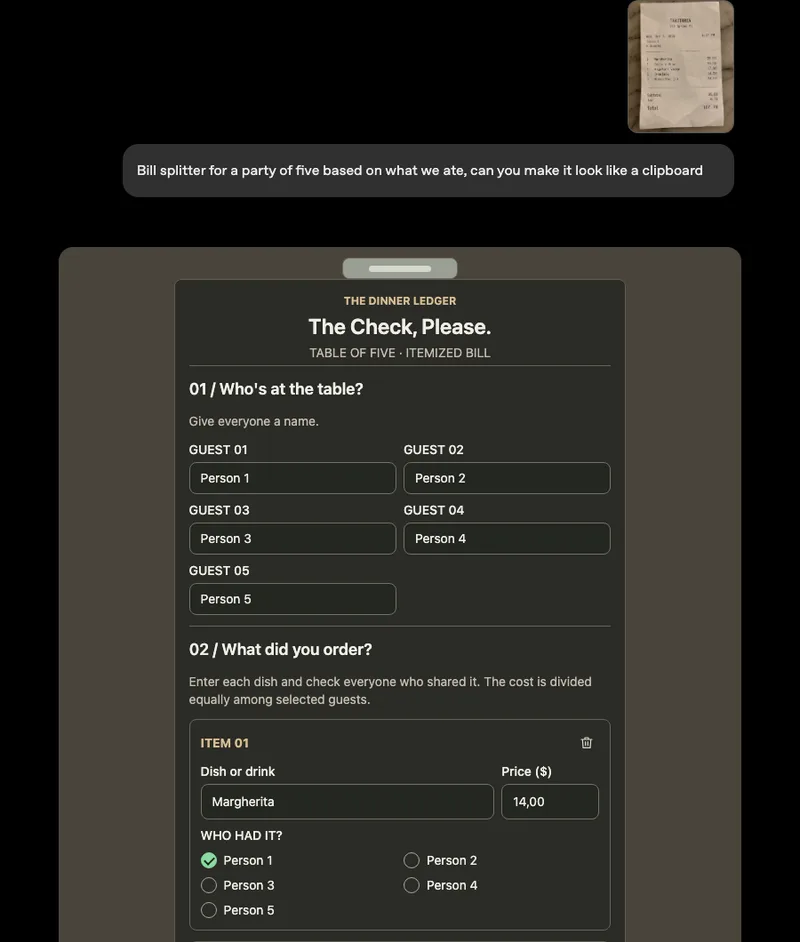
Image: OpenAI, GPT-6 and Intelligent UI for everyone.
ChatGPT also starts answering sooner. The model begins writing while it is still thinking or searching, then adds to the answer. OpenAI says that for questions that need a web search, GPT-6 Instant starts answering 44 per cent sooner on average than its predecessor. That is OpenAI's own measurement; there are no independent figures yet.
What changes for a team on ChatGPT Business or Enterprise?
Most of it happens automatically. The rollout started globally on 7 October for Plus, Pro, Business and Enterprise, and a day later for Free and Go. Paid plans get GPT-6 Sol; Free and Go get GPT-6 Luna, a lighter model. OpenAI says both are tuned for everyday conversation.
Three points matter for an organisation:
- Enterprise has a switch. On Enterprise, whether Intelligent UI is available depends on the workspace admin settings. For Business, OpenAI mentions no such setting.
- Only the chat screen changes. The models behind ChatGPT Work and Codex stay the same. If your team uses those for longer or technical work, nothing changes there for now.
- The announcement says nothing about data storage. It does not say where the new tools are processed and stored, or whether European data residency covers them. If in doubt, check with OpenAI before you put customer data into them.
On safety, OpenAI says GPT-6 is better at recognising when it does not know something or lacks the right information, and at saying so. The details are in the model's system card. These, too, are the maker's own claims.
What should you check in a chart or calculator from ChatGPT?
An interactive answer is more convincing than a paragraph of text. That is exactly why it deserves the same scrutiny. A calculator is only as good as the assumptions inside it, and you do not always see those at first glance.
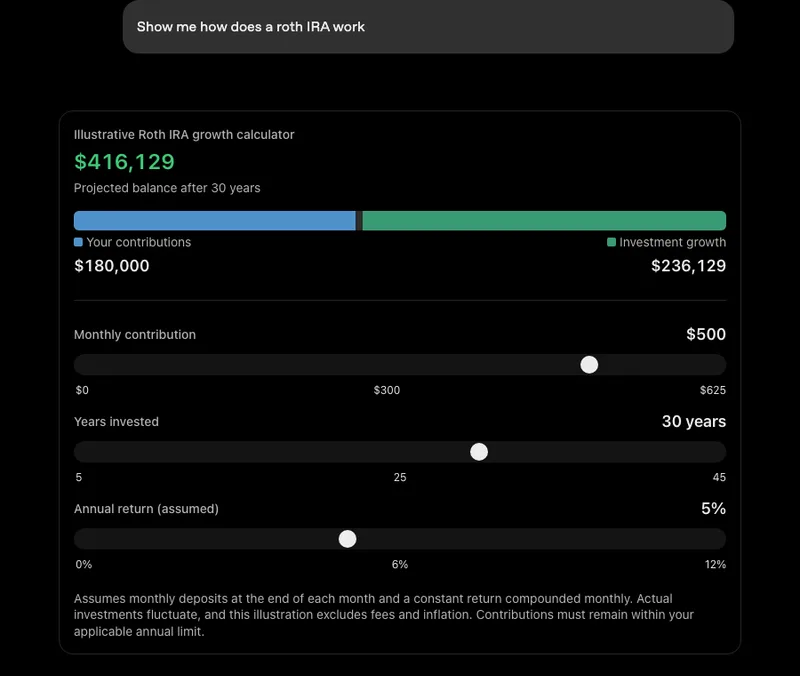
Image: OpenAI, GPT-6 and Intelligent UI for everyone.
OpenAI's own example calculator shows this well: the result depends on an assumed return, and the small print says fees and inflation are left out. Anyone who only looks at the big number misses that.
So agree three things with your team:
- Check the numbers and assumptions, as you would with a text answer. Ask ChatGPT which assumptions it used and where the figures come from.
- Do not copy a chart unchecked into a proposal, report or presentation. Recalculate the key figures in your own source file.
- Keep confidential data out of a tool when you do not know where it is stored. What is and is not allowed belongs in your AI policy; see Using AI safely: how to write an AI policy for your team.
When is a tool in a chat not enough?
A calculator that ChatGPT builds in a conversation is ideal for a one-off question: working out what a price rise does, or visualising a plan for a meeting. For work that comes back every week, it falls short.
Such a tool lives in one conversation of one employee. It is not connected to your CRM, accounts or product data, so someone has to enter the figures by hand every time. Nobody owns it or checks that the calculation still holds, and a colleague asking the same question may get a different tool with different assumptions.
A rule of thumb: if more than one person uses the tool, or you make decisions with it that cost money, turn it into a proper solution. One that runs on your own data, has an owner and gives everyone the same result. That can be a simple dashboard, or a tool inside your own AI workplace where your team also uses the AI models.
What should you do now?
If your team already uses ChatGPT, there is nothing to install. Do this:
- Enterprise: decide whether Intelligent UI should be on, and enable it for a small group first.
- All plans: tell your team that answers may look different, and agree the checks above.
- Watch what keeps coming back. If people keep building the same calculator or overview in ChatGPT, you have found a process that deserves a proper solution.
Still choosing between ChatGPT, Claude and Copilot for your team? Read ChatGPT, Claude or Copilot for your team: how to choose. For the rest of October's news, see AI news October 2026. Want to work out which recurring question in your organisation deserves its own tool? Book a conversation.
Sources
- OpenAI, GPT-6 and Intelligent UI for everyone, 7 October 2026
- OpenAI, Introducing GPT-6 in ChatGPT with Intelligent UI (video), October 2026