In short
- OpenAI DevDay 2026 (29 September) brought more than twenty announcements. The common thread: ChatGPT is becoming a place where agents keep working, teams collaborate and other software runs.
- For European businesses, four things matter most: dots (always-on agents), collaboration in Space and Pages, plugins inside ChatGPT and the cheaper GPT-6.1 Sol model.
- Not everything is equally available in Europe. You cannot get dots on a personal Pro plan, and Ultrafast and the Agents API do not process data in the EU.
OpenAI held its annual developer day, DevDay, in San Francisco on 29 September. The company itself spoke of "more than 20 major announcements". For a managing director or business owner the summary is this: ChatGPT is shifting from an assistant that answers to a workplace where AI carries out tasks on its own. How much of that you can use in Europe today depends heavily on your plan and on your requirements for where data is processed.
Below are the four developments that matter for businesses, each with a link to a more detailed article.
1. Dots: agents that keep working when you stop
The headline. A dot is an agent with its own computer and browser in the cloud that works around the clock on goals you set. Through plugins it can, according to OpenAI, connect to more than 4,000 apps. You decide per type of action whether it may act straight away, must ask first or should hand over to you (OpenAI, Introducing dots).
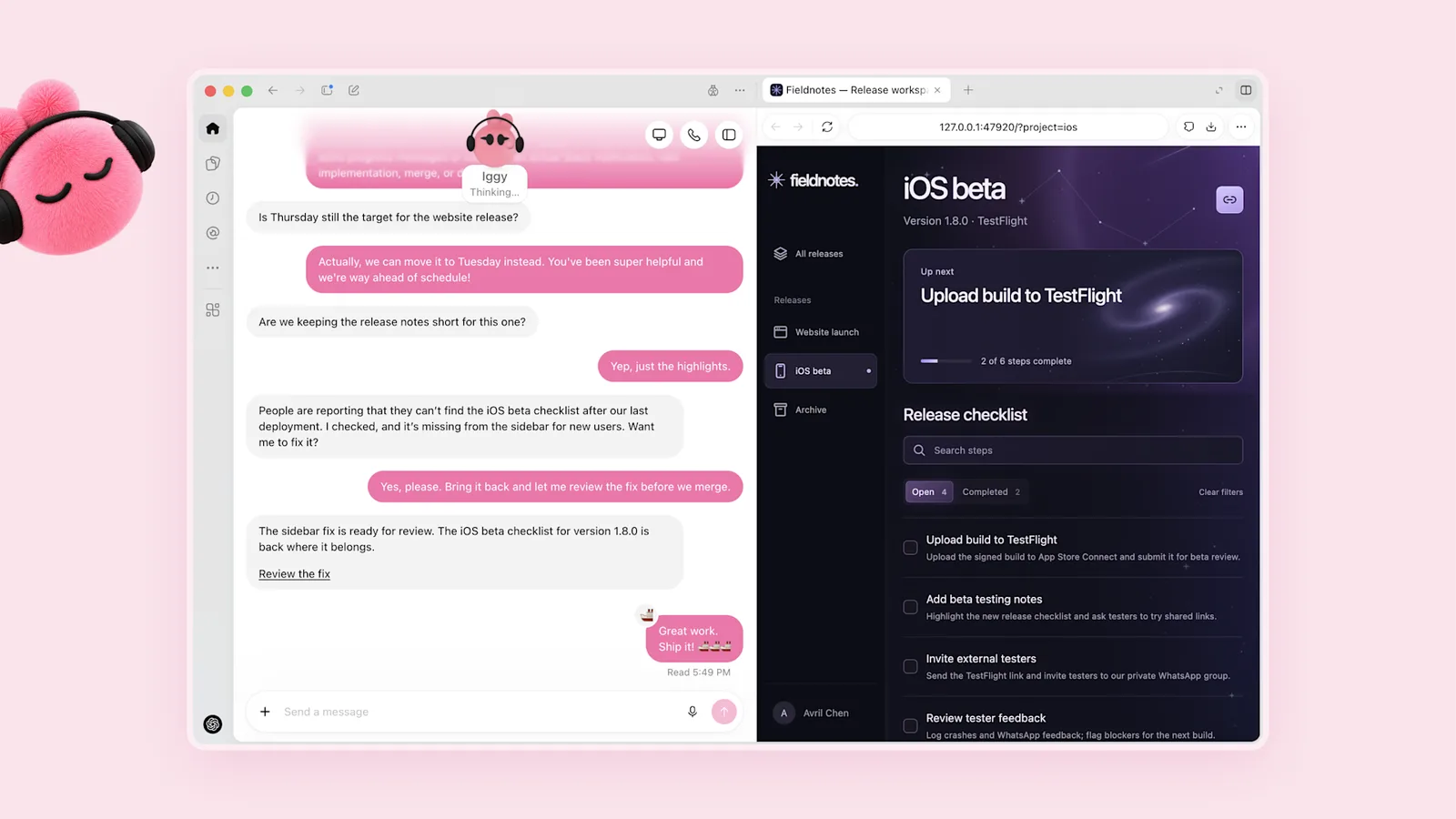
Image: OpenAI, Introducing dots.
In Europe you get dots with ChatGPT Business Premium, or as a beta in Enterprise. Not on a personal Pro plan: OpenAI excludes the EEA, the UK and Switzerland for now, without giving a reason or a date. For organisations there will also be specialist dots with their own identity and access rights. They start as focused pilots with companies, and OpenAI is working on a link with Microsoft Agent 365 for management. More in OpenAI dots: what can you do with them in Europe?
2. Working together in ChatGPT: Space, Pages and Team Tasks
ChatGPT is becoming a shared workplace. In Pages you write with colleagues and AI in the same document, Space holds everything you create, and Team Tasks let you hand recurring work to ChatGPT. You can also call on @ChatGPT in Slack and Microsoft Teams, and the Meetings plugin turns a meeting into notes and action items. Collaborative presentations follow within weeks.
Pages and Space are available on Pro, Business and Enterprise; Teams and the Slack and Teams integration only on Business and Enterprise. More in ChatGPT Space, Pages and Team Tasks.
3. Plugins: other software runs inside ChatGPT
With plugin extensions, apps get their own place in ChatGPT: Canva in the sidebar, Adobe Photoshop and Acrobat as editors for your files, Figma files you can mention in your prompt. With Sign in with ChatGPT, people log in to other apps with their ChatGPT account, and Plus and Pro users can spend their plan there.
For an organisation, the real question is which plugins your staff may use, and with what permissions. More in Plugins and Sign in with ChatGPT.
4. GPT-6.1 Sol, Ultrafast and the Agents API
For anyone using AI in their own software: according to OpenAI, GPT-6.1 Sol comes close to the top model GPT-6 Astra at a fifth of the price (OpenAI, Introducing GPT-6.1 Sol). Ultrafast makes Astra up to six times faster in the API, at six times the price. And the Agents API, available since 10 September, gained computer use: an agent that operates a browser. More in GPT-6.1 Sol, Ultrafast and the Agents API.
What else was announced?
- Pro 500: a new Pro plan with 25 times the allowance of Plus and access to Ultrafast.
- Private Intelligence: OpenAI says Zero Data Retention with private safety processing means no content is stored. Private Inference, with confidential computing, follows this autumn as a preview.
- Codex in the cloud: developers run Codex on a computer, remotely from a phone or in the cloud.
- Sites with plugins for Business and Enterprise, and the OpenAI Marketplace, where large customers can spend their OpenAI budget on software from 32 partners. For now, Enterprise customers can only register interest.
What can you use in Europe today?
| Announcement | Available in Europe? |
|---|---|
| Dots | Yes on Business Premium, beta on Enterprise. Not on Pro. |
| Space and Pages | Yes on Pro, Business, Enterprise; no EU data residency mentioned |
| Team Tasks, Slack and Teams | Yes on Business and Enterprise |
| Meetings plugin | Beta on macOS for Pro and Business |
| Plugin extensions | Yes on paid plans; Free and Go to follow |
| GPT-6.1 Sol via the API | Yes, including EU data residency |
| Ultrafast and Agents API | Usable, but without EU processing |
What this means for your business
The big shift is that AI increasingly acts instead of answers. A dot sends a message, a Team Task prepares a report every week, a plugin writes back to your CRM. That saves time, but only if you settle in advance what AI may do on its own. Our five questions for that are in Using AI agents safely.
It is also a reason to think about where your AI work happens. If you do everything in ChatGPT, you depend on OpenAI's choices: which features reach Europe, what they cost and where the data lives. The day before DevDay, according to CNBC, OpenAI pulled the launch of GPT-6.1 Astra because the model did not meet its own safety standards. The platform moves fast.
When you do not need to act
If your team uses ChatGPT now and then for writing and analysis, little changes for you. The news matters mainly if you want to build AI into processes, collaborate with AI as a team or put agents to work. Even then there is no rush: many parts are in beta or "coming soon", and prices after the introductory month are still unknown.
A sensible next step
Pick one process with a lot of manual work today, and look at which of these new features would help there. Would you rather have one workplace with your own AI tools, permissions and audit log, independent of a single vendor? That is what a Hello Growth AI workplace does.
Want to work out together what this news means for your organisation? Book a conversation.
Sources
- OpenAI, DevDay 2026 Recap, 29 September 2026
- OpenAI, Introducing dots, 29 September 2026
- OpenAI, Introducing GPT-6.1 Sol, 29 September 2026
- OpenAI, Ultrafast mode
- OpenAI, Your data (data residency)
- OpenAI, DevDay 2026 Keynote, YouTube, 29 September 2026
- CNBC, OpenAI DevDay 2026: Live updates and announcements, 29 September 2026